← Scheduling steps to your Agenda
If you’d rather see your scheduled steps and class meetings in Apple’s own Calendar and Reminders apps, StudiFoca can keep them in sync—one-way, from StudiFoca out, so your existing Reminders and Calendar entries aren’t touched.
Turning on sync
In Settings → iCloud Calendar & Reminders, switch on Sync with iCloud Calendar & Reminders, then choose what syncs where: class meetings, assignments and assessments to Calendar, scheduled steps to Reminders.
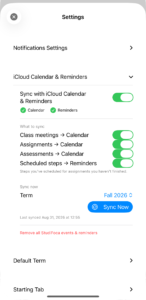
Sync switched on, all three categories enabled, with a Sync Now button for the currently selected term and a timestamp of the last sync.
What shows up in Reminders
Once synced, scheduled steps appear in the Reminders app as ordinary reminders, dated and grouped the way you’d expect—searchable and checkable there even if you never open StudiFoca that day.
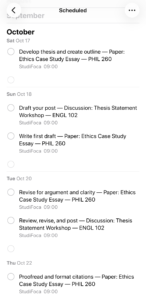
The Reminders app’s Scheduled list, October: steps from the Ethics Case Study Essay and the Thesis Statement Workshop discussion, each dated and tagged “StudiFoca.”
Checking a reminder off in Reminders doesn’t check off the step in StudiFoca—the sync is one-way, so StudiFoca stays the source of truth for what’s actually been done. Use Sync Now after making changes in StudiFoca to push them to Reminders again.