← The Agenda view & why there’s no calendar
Focus Blocks
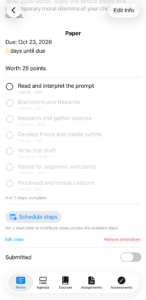
Every step StudiFoca suggests is sized in minutes of work—Review lab notes and raw data: 30m. Write the Discussion: 1h. That’s how the app knows a lab report is bigger than a reading response, and it’s what the workload heat map is measuring against the free time in a day.
A Focus Block is your own unit on top of that: one uninterrupted sitting, 25 minutes unless you set it otherwise in Settings. Estimates show both—30m is 1.2 blocks at 25 minutes, or 0.7 at 45—so you can read a step as time or as sittings, whichever you plan by. Change your block length and the minutes stay put; only the block count moves. Which one is shown first is up to you—Show blocks first, in Settings—except in the step editors, which always lead with minutes because that’s what the stepper changes.
StudiFoca will not time you
There’s no countdown. Nothing starts when you sit down and nothing judges you when you get up.
That’s deliberate. The block takes its 25 minutes from the Pomodoro Technique—see Sources—and that technique works well for a lot of people. But a running timer does something specific to a brain that already has trouble starting: it turns I haven’t begun yet into a number that keeps getting bigger. For plenty of the students this app is built for, that isn’t motivation. It’s one more thing to feel bad about.
So StudiFoca uses the block for planning, and stops there. It’s a ruler, not a stopwatch. It answers how big is this?—never how long have you been sitting there?
If you like working to a timer, use whichever one you already trust. The blocks will still tell you what to aim at.