The Agenda is the view that ties everything together: a day-by-day list of class meetings and due items, plus a workload heat map showing how heavy things look over the coming days, weeks, or the rest of the term. For the thinking behind why this replaces a calendar, see The Agenda view & why there’s no calendar.
A day on the Agenda
Each day groups into three sections: Classes, from your course meeting schedule; Due, the assignments and assessments with that due date; and Work Planned, the steps you’ve scheduled for that day.
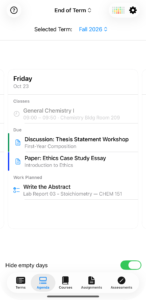
Friday, Oct 23: a General Chemistry I meeting, two items due—a discussion post and a paper—and one step planned, the abstract for a lab report.
The workload heat map
Tap the grid icon to open the Workload Heat Map, viewable by Week, Month, or Full Term. Each day is shaded from “Less” to “More” based on how much is due or scheduled that day. Days before today show the lightest shade—the map looks forward from today, not back.
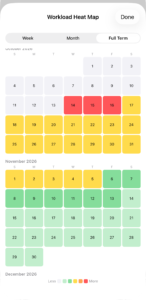
Full Term view, October–November: a run of red days stands out clearly against the lighter weeks around it—a crunch week you can see coming instead of discovering on the day.
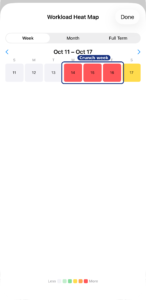
Zoomed to Week view, Oct 11–17: the same stretch up close—three solid red days mid-week, easing to yellow by the weekend.
On iPad
The layout adapts to the wider screen but shows the same information—classes, due items, and the heat map toggle in the top corner.
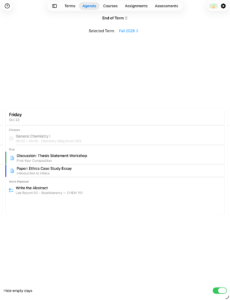
The iPad Agenda view.